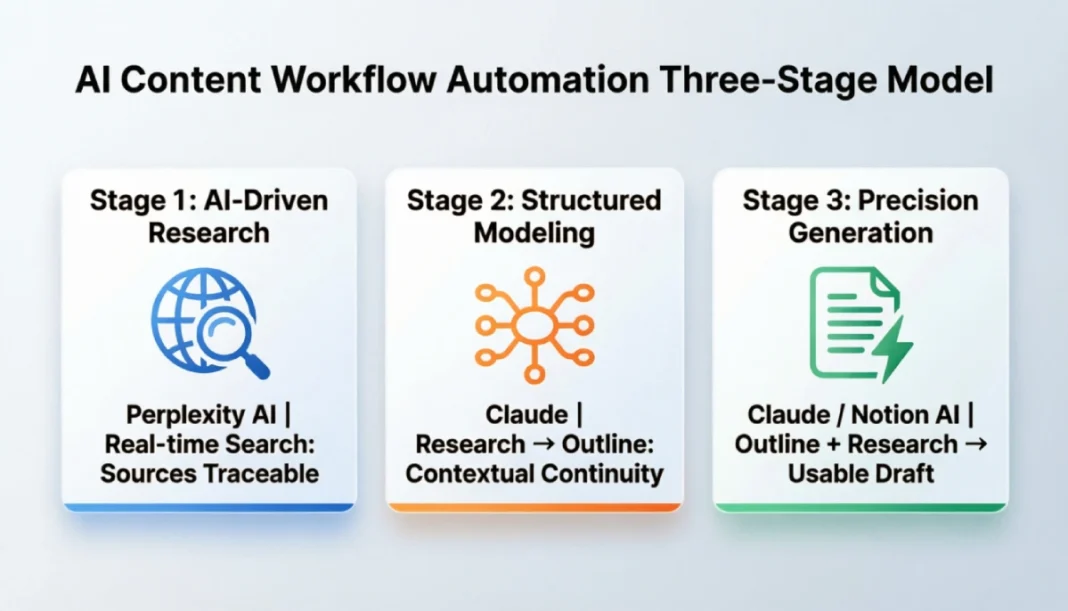
An AI content workflow automation pipeline has three stages: research (Perplexity), structuring (Claude), and drafting (Claude or Notion AI). Each stage feeds the next using structured prompts, cutting a typical 6–8 hour-long form blog post process down to 2–3 hours of focused production time.
Why Most Content Workflows Waste Time
Most content teams don’t have a slow writing problem. They have a fragmented process problem.
A writer opens five browser tabs for research. They paste notes into a Google Doc. Then they switch to another tool to outline. By the time they start drafting, the context from their research has been diluted—studies on knowledge work suggest context switching can consume 30–45 minutes of productive focus per task transition. The draft ends up shallow, and the revision takes longer than writing did.
This isn’t a productivity failure — it’s a workflow design failure. And AI tools don’t fix it automatically. Plugging ChatGPT into a broken process just gives you AI-assisted chaos.
The fix is building a pipeline, not just using tools.
This pipeline approach aligns with ContentOps principles: treating content creation as a scalable, measurable system rather than a series of one-off tasks.
The Typical Broken Workflow
- Research happens in browser tabs with no structure
- Notes live in a document no one formats consistently
- The outline gets built from memory, not from research
- Drafting starts from scratch instead of from structured inputs
- Tools don’t talk to each other, so everything gets copy-pasted manually
Every one of those transitions loses information and time.
These fragmentation points reflect a common gap in content operations: the lack of a unified content brief that travels with the piece from research to publication.
What a Real AI Content Pipeline Looks Like
Here’s what actually works: a three-stage AI writing workflow where each step hands off cleanly to the next:
- Research — gather what you need, structured from the start
- Structure — turn research into a brief outline
- Draft — generate a first draft with enough context to be usable
What makes this different from just “using AI tools” is the handoff. Each stage produces a specific output that becomes the input for the next stage. Nothing starts from a blank page.
The Three-Stage Model
Think of it like an assembly line, not a toolbox. The goal isn’t to use three AI tools — it’s to design a system where output from one stage feeds directly into the next without you rebuilding context each time.
Stage 1 — Automate Your Content Research with AI
Perplexity AI is the right tool here, and the reason is straightforward: it searches the web in real time and cites its sources. Unlike using a standard language model for research, Perplexity tells you where information comes from, which matters when you’re writing content that needs to be accurate.
For a post targeting “AI content workflow automation,” your Perplexity prompt might look like this:
“What are the most common steps in an AI-assisted content production workflow for [specific content type, e.g., B2B blog posts] in 2024–2025? Include specific tools used at each stage, typical time savings reported by [target audience, e.g., content teams], and any limitations users frequently mention. Cite your sources.”
That single query returns structured, cited research in under a minute.
What to Extract and How to Store It
Don’t paste the raw Perplexity output directly into your draft. Instead, extract:
- Core claims (what the research actually says)
- Tool names and their specific functions are mentioned in the results
- Questions the research raises but doesn’t fully answer (these become your content gaps to fill)
- Phrases your target audience uses when searching (pull these from suggested questions and related searches)
Paste this extracted summary into Notion as a “Research Block” under your content brief. Label it clearly. This becomes the raw material for Stage 2.
Stage 2 — Build a Structured Outline Using Claude
This is where most people make the critical mistake: they open Claude and type “write me an outline about AI content workflows.” That produces a generic outline pulled from Claude’s training data — not one grounded in the research you just did.
The fix is simple: bring your research into the prompt.
Writing the Prompt That Carries Research Context
Your Claude prompt for outlining should follow this structure:
“I’m writing a [word count] how-to article for [target audience] about [topic]. Here is the research I’ve gathered: [paste Research Block]. Based on this, create a detailed H2/H3 outline that covers the topic thoroughly, addresses the gaps in the research, and is structured for someone who wants practical, step-by-step guidance. The primary keyword is [keyword].”
This prompt follows core prompt engineering practices: providing context, specifying output format, and defining constraints to reduce hallucination risk.
This prompt works because it does three things: it feeds Claude your actual research (no guessing), calibrates depth for your audience, and flags content gaps where your piece can stand out.
Turning Research Output Into a Working Outline
Claude will return an outline with logical H2 and H3 sections. Review it against two questions:
- Does the structure match the reader’s actual journey (problem → understanding → action)?
- Are there sections that look complete but would require fabricated data to fill?
If any section would require Claude to invent statistics or tool features it can’t verify, flag it now. You’ll either fill it with real data from your research or cut it.
Save the approved outline back in Notion, attached to the same brief as the Research Block.
Stage 3 — Generate the First Draft
With a research block and a grounded outline, you’re no longer drafting — you’re assembling. This distinction matters because it changes what you ask of the AI.
Using Claude or Notion AI for Drafting
For full-article drafts, Claude handles longer context better than most tools. Notion AI works well for section-by-section drafting inside your Notion workflow, but it has shorter context windows, so it loses thread across long articles.
Claude’s larger context window (up to 200K tokens) lets it hold your full research block and outline in memory, reducing the ‘lost in the middle’ effect that can fragment shorter-context tools.
A practical approach: use Claude for the full first draft, then use Notion AI for revision passes on individual sections.
Your drafting prompt should include:
“Using this outline [paste outline] and this research [paste Research Block], write a [word count] how-to article in a clear, direct tone for intermediate-level readers. Write in paragraphs. Use bullet points only for lists and steps. Do not add claims not supported by the research provided. Flag any section where you’re drawing from general knowledge rather than the provided research.”
That last instruction — asking Claude to flag knowledge gaps — is one most people skip. It saves you from publishing inaccuracies.
What Makes a Draft Actually Usable
A first draft is usable if it requires editing, not rebuilding. You’re aiming for a draft where:
- The structure matches your outline
- Claims are traceable back to your research
- Sections aren’t padded with filler to hit word count
- The tone is consistent throughout
Plan on 30–45 minutes of editing for a 2,000-word Claude draft—that’s the sweet spot where AI saves you time without sacrificing your voice. If you’re spending more than that, your input prompts need more specificity.
Connecting the Pipeline — Tools, Handoffs, and Storage
The tools themselves aren’t complicated. The connection between them is where most GPT content pipelines fall apart.
Using Notion as Your Content Hub
Notion works well as the central layer because it handles both structured data (databases, templates) and free-form text. A basic content brief template in Notion should have:
- Target keyword and secondary keywords
- Search intent and target audience
- Research Block (from Perplexity)
- Approved Outline (from Claude)
- Draft (from Claude, pasted in)
- Revision notes and publishing status
By keeping research, outline, and draft in one Notion page, you create a single source of truth for each piece—critical for team collaboration and future updates.
This structure means every piece of content has a traceable production history. When you return to update a post six months later, you know exactly what research it was built on.
Free vs Paid Stack Options
Choose your stack based on content volume: solo creators (<5 posts/month) can start free; teams scaling beyond 10 posts/month should prioritize Claude Pro for context handling and Perplexity Pro for research depth.
| Stage | Free Option | Paid Option |
|---|---|---|
| Research | Perplexity (free tier, limited) | Perplexity Pro (~$20/month) |
| Outlining + Drafting | Claude.ai free tier | Claude Pro (~$20/month) |
| Storage + Workflow | Notion free tier | Notion Plus (~$10/month) |
A solo content creator can run a functional version of this pipeline for free with usage limits. A content team producing more than 8–10 posts per month will hit those limits fast and will need paid tiers, particularly for Claude.
Common Mistakes That Break the Workflow
Most failures aren’t tool failures. They’re process failures dressed up as tool problems.
- Starting a new prompt without prior context. Every AI session starts blank. If you don’t paste your research and outline into the drafting prompt, you get a generic output.
- Using AI for research verification. Perplexity cites sources. Claude does not search the web by default. Don’t ask Claude to confirm statistics — it will sometimes produce plausible-sounding numbers that aren’t real.
- Treating the first draft as final. AI drafts are first passes. The workflow saves time in production, not in judgment. You still need to verify claims, adjust tone, and cut padding.
- Building the pipeline for one post, not as a repeatable system. The time savings compound when the workflow is templated. A one-off experiment saves 30 minutes. A templated system saves hours per week.
- Ignoring prompt versioning. If a prompt produces a great output, save it. Most people don’t. Then they spend time rebuilding the same prompt the following week.
How to Measure Whether It’s Actually Working
Don’t measure success by how fast you produce a draft. Measure it by the total time from the topic to the published post.
Track:
- Time per stage — research, outlining, drafting, editing, publishing
- Revision rounds — are AI drafts requiring more or fewer edits over time?
- Content quality signals — search rankings, time on page, conversion (depending on your goals)
A well-implemented AI-for-content-teams workflow typically cuts production time from 6–8 hours per post to 2–3 hours. That’s not a guarantee — it depends on the topic’s complexity, your editing standards, and how well your prompts are crafted. But it’s a realistic benchmark to test against.
If you’re at 5 hours after a month of using the pipeline, your prompts need refinement — not more tools.
FAQs
Q. Can I use ChatGPT instead of Claude for this workflow?
Yes. The prompting logic works with any capable language model. Claude tends to handle longer context and structured outputs more consistently, but GPT-4 or GPT-4o will produce comparable results with similar prompts.
Q. Do I need all three tools, or can I use just one?
You can compress the pipeline. Claude alone can handle research summaries (without live web access), outlining, and drafting. But you lose source verification, which matters for factual accuracy. Perplexity adds real-time, cited research that Claude can’t replicate by default.
Q. Is this workflow suitable for a team, or just solo writers?
It works for both, but teams need shared Notion templates and agreed-upon prompt standards. Otherwise, two writers using the same tools will produce inconsistent results because their prompts are different.
Q. How do I handle topics that require expert-level accuracy?
AI tools are not a substitute for subject matter expertise on technical or regulated topics (medical, legal, financial). Use the pipeline for structure and speed, then have a qualified reviewer verify claims before publishing.
Q. Will this hurt content quality compared to fully manual writing?
Only if you treat AI output as final. The pipeline improves speed. Quality depends on what you do with the draft — specifically, how well you edit, verify, and add original perspective that the AI can’t generate.