A customer emails your support team at 2 AM asking for a refund status. Your CRM has the data. Your refund policy is in a document. The answer is straightforward — but a human still has to find it, check it, and reply.
That’s a prime AI agent’s use case: building autonomous workflows that resolve routine requests at 2 AM—no human handoff required. Not because it was pre-programmed with every possible scenario, but because it can reason through the problem, pull the right information, and act on it.
Here’s the real difference: while automation follows a script, AI agents figure out the next step as they go. And in 2025, they’ve moved from research demos to tools that engineering teams, operations managers, and even solo founders are deploying in production.
This guide explains how they actually work, which tools are worth using, and how to build real autonomous workflows — not toy demos.
What Is an AI Agent, Actually?
An AI agent is a system that uses a large language model (LLM) to reason through a task, decide what actions to take, execute those actions using external tools, and loop back until the task is complete.
Think of an AI agent like a smart intern: it tries a step, checks the result, and adapts—looping until the job’s done. That iterative ReAct pattern (Reason + Act + Observe) is what enables handling messy, real-world tasks. Traditional automation is linear — if this, then that. An agent is iterative. It checks its output, decides whether it’s done, and keeps going if it isn’t.
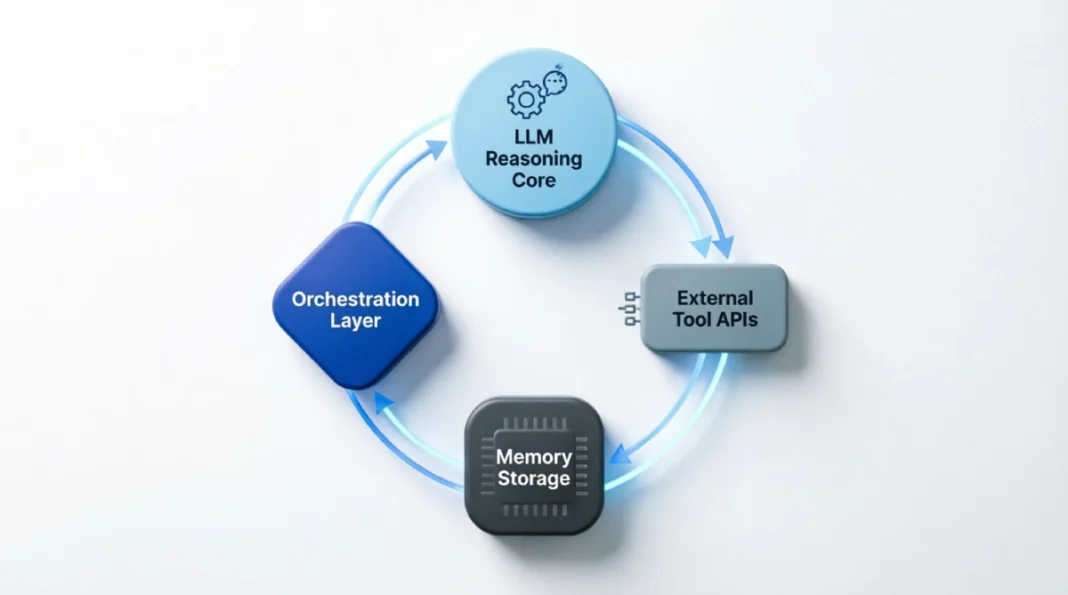
The standard architecture looks like this:
- LLM core — the reasoning engine (GPT-4o, Claude, Gemini, Llama 3, etc.)
- Memory — short-term (conversation history) and long-term (vector database or external storage)
- Tools — web search, code execution, APIs, file readers, calculators
- Orchestration layer — the loop that ties reasoning to action
The most common reasoning pattern is called ReAct (Reasoning + Acting). The agent thinks about what to do, takes an action, observes the result, and then thinks again. This continues until it reaches a final answer or hits a stopping condition.
What makes this powerful is that the agent doesn’t need to know the answer upfront. It figures out how to get the answer.
AI Agents vs. Standard Automation: Where the Line Is
This distinction matters before you commit to building anything.
| Factor | Standard Automation (RPA, Zapier) | AI Agents |
|---|---|---|
| Input type | Structured, predictable | Unstructured, variable |
| Decision-making | Rule-based (Zapier, Make, UiPath) | Reasoning-based (LangGraph, CrewAI, AutoGen) |
| Handles exceptions | No | Yes |
| Requires structured data | Yes | No |
| Setup complexity | Low | Medium–High |
| Cost per run | Low | Higher |
Use standard automation when the process is stable, inputs are predictable, and exceptions are rare. Use AI agents when the task involves judgment, variable inputs, or multi-step reasoning that changes based on context.
If you’re routing a form submission to a Slack channel — use Zapier. If you’re triaging customer complaints, summarizing them, checking order history, and drafting a response — use an agent.
The Most Valuable AI Agent Use Cases Right Now
These aren’t hypothetical. These are patterns that teams are running in production.
Customer Support Automation
This is the highest-adoption use case. An agent connected to your CRM, knowledge base, and ticketing system can:
- Classify incoming support tickets
- Look up order or account data
- Draft responses based on policy documents
- Escalate to a human when confidence is low
Companies using this pattern are reporting 40–60% reductions in first-response time on Tier 1 tickets. The key is building a reliable escalation condition — the agent needs to know what it can’t handle.
Data Research and Summarization
Analysts spend hours pulling data from multiple sources, comparing it, and writing summaries. An agent can do this in minutes by:
- Running web searches across specified sources
- Extracting structured data from documents or URLs
- Cross-referencing and identifying patterns
- Outputting a formatted report
Think competitive intel, market scans, or financial dashboards — tasks that used to take analysts hours, now done in minutes.
Code Review and Generation Pipelines
Software teams are running agents that review pull requests, check for common issues, run test suites, and post structured feedback — all triggered by a GitHub webhook. More advanced setups have agents writing boilerplate code from a specification, then running tests to verify it.
Lead Qualification and Outreach
Sales teams feed incoming leads into an agent that checks LinkedIn data, company size, recent news, and product fit signals, then generates a personalized first-touch email and pushes it to a CRM with a priority score. This is replacing what previously required a full SDR workflow for low-complexity leads.
Internal Knowledge Retrieval
Large organizations with documentation scattered across Confluence, Notion, Google Drive, and Slack are building agents that answer employee questions by searching across all those sources simultaneously — rather than forcing people to know where to look.
Tools and Frameworks Worth Knowing
The landscape has consolidated significantly. Here’s what’s actually being used in 2025:
LangChain
The most widely adopted framework for building LLM-powered applications and agents. It provides pre-built components for tool integration, memory, and agent orchestration. Best for developers who want control and flexibility.
- Good for: Custom workflows, production deployments, complex tool chains
- Downside: Can be verbose; the abstraction layer occasionally gets in the way
- Pricing: Open source; hosting costs depend on your stack
LangGraph
Built on top of LangChain, LangGraph adds a graph-based execution model — meaning you can define explicit states and transitions. This is more reliable for multi-step agents that need predictable flow control.
- Good for: Complex agents with conditional branching, human-in-the-loop requirements
- Downside: Steeper learning curve
- Pricing: Open source
CrewAI
Designed specifically for multi-agent systems where different agents have defined roles and collaborate on a task. You define a “crew” — a manager agent, a researcher agent, a writer agent — and they work together.
- Good for: Research + writing pipelines, workflows that benefit from specialization
- Downside: Overkill for single-agent tasks; coordination adds latency
- Pricing: Open source core; CrewAI+ cloud platform has paid tiers
AutoGen (Microsoft)
Microsoft’s framework for building conversational multi-agent systems. Strong integration with Azure OpenAI and enterprise tooling.
- Good for: Enterprise deployments, teams already in the Microsoft stack
- Downside: Less community tooling than LangChain outside the Microsoft ecosystem
Microsoft Semantic Kernel
For .NET teams already in Azure, Microsoft Semantic Kernel offers multi-agent orchestration with tighter Azure AD and compliance controls than generic frameworks.
- Good for: Enterprise deployments with existing Microsoft infrastructure
- Downside: Smaller community ecosystem compared to LangChain
No-Code / Low-Code Options
- n8n — Workflow automation with native AI agent nodes. Solid middle ground between Zapier and full code.
- Relevance AI — Purpose-built for business teams building agents without heavy engineering. Good for sales and ops use cases.
- Flowise — Open-source, visual LangChain builder. Self-hostable.
If your team can’t write Python but needs agents running in production, Relevance AI or n8n are the most production-ready no-code options right now.
Emerging Option: Prefer minimal abstraction? Evaluate Agno (formerly Phidata), a Python-native framework focused on composable agent primitives without heavy orchestration overhead.
How to Build a Simple Autonomous Workflow
Here’s a concrete example: an email triage agent that reads incoming support emails, classifies them, looks up relevant data, and drafts a response.
Step 1: Define the Task Boundaries
Before writing a single line of code, answer:
- What is the agent allowed to do? (read emails, query CRM, draft replies)
- What is it not allowed to do? (send emails without review, access billing systems)
- When should it escalate? (refund requests over $500, legal language, abuse)
This is the most important step. Set fuzzy boundaries, and your agent either freezes up or starts doing things you never asked for — like emailing a refund without approval.
Step 2: Choose Your LLM and Framework
For most business workflows, GPT-4o or Claude 3.5 Sonnet are the right choices for the reasoning core. They balance capability and cost reasonably well. For the framework, if you have a developer, start with LangGraph — it forces you to think explicitly about states, which reduces unexpected behavior.
Step 3: Define the Tools
Your agent needs tools to interact with the world. For this example:
- Email reader — Gmail API or IMAP connector
- CRM lookup — REST API call to Salesforce, HubSpot, etc.
- Knowledge base search — vector search over your support docs (Pinecone, Weaviate, Chroma, or pgvector work well)
- Draft writer — just the LLM itself, with a structured prompt
Each tool is a function that the agent can choose to call. You describe what each tool does in plain language, and the LLM decides when to use it.
Step 4: Build the Reasoning Loop
The agent loop for this workflow looks like:
- Receive email text as input
- Classify: billing, technical, general, escalation?
- If billing or technical, query CRM for account details
- Search the knowledge base for relevant policy or troubleshooting steps
- Draft response using retrieved context
- Check: Does this meet the escalation criteria?
- If yes — flag for human review. If no — output draft.
In LangGraph, each of these steps is a node. The edges between nodes are conditions. This makes the logic explicit and debuggable — which matters a lot in production.
Step 5: Add Memory (If Needed)
For single-ticket workflows, you don’t need long-term memory. But if you’re building an agent that handles multi-turn conversations or needs to remember context across sessions, you’ll need a memory layer.
The two most practical options:
- Short-term: Pass the full conversation history in each prompt (works up to context window limits)
- Long-term: Store summaries or key facts in a vector database like Pinecone (managed), Weaviate (hybrid search), or Chroma (open-source, self-hosted) based on your team’s infrastructure comfort, and retrieve them at the start of each session
Don’t over-engineer memory early. Start without it, add it when you hit a specific limitation.
Step 6: Test With Edge Cases First
Most agent failures happen at the edges — unexpected input formats, missing data, API errors, or the agent getting stuck in a loop. Before testing happy paths, deliberately test:
- Emails with no clear category
- Customers not found in the CRM
- Knowledge base returning no relevant results
- Malformed API responses
Build explicit fallbacks for each. An agent that fails gracefully is far more useful in production than one that works perfectly on clean data.
Common Mistakes That Kill Agent Projects
- Giving the agent too much autonomy too fast. Start with the agent drafting outputs for human review. Move to full automation only after you’ve seen it handle edge cases correctly at scale.
- Skipping tool error handling. If a tool call fails and the agent has no fallback, it either halts or hallucinates a response. Every tool call needs a structured error return.
- Using the wrong model for the task. GPT-4o is not necessary for every step. Routing and classification tasks can run on cheaper models (GPT-4o-mini, Claude Haiku). Running everything on frontier models inflates costs fast.
- No logging? You’re flying blind. Use LangSmith or Helicone to trace every tool call and LLM decision—without that audit trail, you can’t debug failures or optimize cost.
- Building multi-agent systems before you need them. Multi-agent setups add coordination complexity and latency. A single well-designed agent handles most business workflows. Don’t reach for CrewAI or AutoGen until a single agent genuinely can’t do the job.
Performance, Cost, and What to Realistically Expect
A straightforward customer support agent processing 1,000 tickets per day with GPT-4o will cost roughly $15–40/day in API costs, depending on ticket length and retrieval complexity. That’s $450–1,200/month, which is typically well below the cost of the human hours it replaces. Track cost-per-task with Helicone or PromptLayer to pinpoint which agent steps drive 80% of your API spend—then optimize prompts or switch models for those specific calls.
Latency is the other factor. A single-agent loop with two tool calls typically completes in 3–8 seconds. Multi-agent workflows with 4+ agents coordinating can take 20–60 seconds. For real-time customer interactions, this matters. For async workflows (nightly reports, batch processing), it doesn’t.
Accuracy is the number that most people don’t measure properly. Track the rate at which your agent produces an output that a human would approve without edits. For well-scoped tasks with good tool coverage, expect 70–85% out of the box. With prompt refinement and better retrieval, 90%+ is achievable. 100% is not — build your system assuming the agent will occasionally be wrong.
Security Considerations You Shouldn’t Skip
AI agents that have access to APIs, databases, and external services are a meaningful security surface. Before going to production:
- Principle of least privilege — give the agent access only to what it needs for the specific task. No broad database permissions.
- Input sanitization — treat all external inputs (emails, web content, user messages) as adversarial. Use PromptArmor or LangSmith’s trace filters to detect and block prompt injection attempts before they reach your LLM core. Prompt injection attacks are a real threat.
- Human review gates — for any action that’s irreversible (sending emails, deleting records, initiating payments), require human confirmation or, at a minimum, a time delay with audit log.
- Rate limiting on tool calls — prevent runaway loops from hammering your APIs or generating unexpected costs.
- Audit logging — every action the agent takes should be logged with timestamps, inputs, and outputs for review.
Where This Is All Going
The shift happening right now is from single-agent pipelines to networks of specialized agents that hand off tasks to each other — similar to how a company has specialized departments. An orchestrator agent routes tasks to a research agent, a writing agent, a QA agent, and an integration agent.
This is already working in engineering teams (coding agents that plan, write, test, and review code) and in complex research workflows. The tooling is still maturing — LangGraph and AutoGen are the most production-ready frameworks for this pattern today.
The teams winning with AI agents aren’t chasing the fanciest architecture — they’re nailing one narrow workflow first, then expanding. They’re picking narrow, high-value workflows, building reliable agents for those specific tasks, measuring output quality carefully, and expanding from there.
That’s the actual playbook. Start narrow, instrument everything, and expand only when the current agent is working reliably.
FAQs
Q. What are AI agents and how do they work?
AI agents use an LLM as a reasoning core to break down tasks, call external tools (APIs, databases, search), and loop through results until the task is complete — rather than following a fixed script.
Q. What’s the difference between AI agents and regular automation?
Standard automation follows rigid rules on predictable inputs. AI agents handle variable, unstructured inputs by reasoning through them — so they can deal with exceptions, not just expected paths.
Q. Which tools are best for building AI agents?
LangGraph and LangChain for developers who want control; CrewAI for multi-agent workflows; n8n and Relevance AI for teams that can’t write code but need production-ready agents.
Q. What are the most practical AI agent use business cases?
Customer support triage, lead qualification, internal knowledge retrieval, and data research are the highest-adoption use cases right now — all tasks that involve judgment on variable inputs.
Q. How do I build an AI agent without coding experience?
Use n8n or Relevance AI — both offer visual builders with native AI agent support. Define clear task boundaries, connect your tools (CRM, knowledge base, email), and start with human review before full automation.
Q. What’s the ROI of AI agents for autonomous workflows?
Teams report 40–60% faster Tier-1 response times and 15–25 hrs/week saved per workflow—track approval rate and cost-per-task to measure your baseline.
Q. Can I build AI agents without coding?
Yes. Tools like Relevance AI and n8n offer visual builders for autonomous workflows; start with human-review mode before full automation.